GeoWorlds Project, Distributed Scalable Systems Division
University of Southern California Information Sciences Institute



|
GeoWorlds Project, Distributed Scalable Systems Division
|
How can I perform a geo-located query?The query tool can automatically fill out geo-locational fields in search engines, such as the GTE SuperPages. Also, it can add the geo-locational names as additional Boolean constraints to search engines. Also, see How can I get the latest place names exported from the Map manager.
How can I exchange documents and/or categories among users?Clipbook servers provide a way to exchange information among remote clients. The information exchanged can be a partial category, an entire category, or a window panel. Also, see What is the difference between the Clipboard and the Clipbook.
What is the advanced functionality available for manipulating documents in the Category Editor?See the functionality listed below.
CompareUse a 3D bar chart to compare the content of two category structures (A and B). The structures can be select from either the Category Editors window or the Document Analysis window. Three comparison metrics are provided:
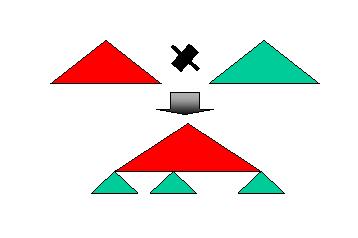
CrossCompute the cross product of two categories. This operation is conceptually depicted by the following picture:
IntersectCompute the intersection of two categories (A intersect B) at the document level, i.e., the position of the document in the category structure is ignored for the purpose of determining document equality. This operation is equivalent to removing all the documents in A that do not occur in B.
SubtractCompute the subtraction of two categories (A - B) at the document level, i.e., the position of the document in the category structure is ignored for the purpose of determining document equality. This operation is equivalent to removing all the documents in A that occurs in B.
AddCompute the addition of two categories (A + B) at the document level, i.e., the position of the document in the category structure is ignored for the purpose of determining document equality. This operation is equivalent to adding from B to A documents that do not occur in A.
DuplicateMake a clone of a category. Show me! (first portion of subtract Show me!)
Flatten pathsThe two flatten path operations are available. Flatten Paths collapses a multi-level category into an one level category, i.e., a root node with children as leaves. The names of the collapsed node are pre-appended to the name of the leaves. Flatten Paths 1 adds a intermediate level of nodes for a two-level category. Show me! (Flatten Paths) Show me! (Flatten Paths 1)
Leaf nodesSimilar to Flatten Paths except that names of the collapsed nodes are not prepended to the name of the leaves.
Domain namesReclassify documents of a category based on the URL domain names of the documents.
Categorize by property valueEach category is associated with a list of property name/value pairs. Reclassify categories based on their property values.
SortAlphabetically sort a category's children based on their name.
Sort recursivelyAlphabetically sort a category's descendents of based on their name.
Prune out empty categoriesDelete categories that do not contain any children with documents.
Count documentsFor each category, count the number of descendents it has.
Clear propertyEach category is associated with a list of property name/value pairs. Delete one or more property name/value pairs from a category.
Set propertySet a property name/value pairs of a category.
How can I customize the software to my own needs?See below for the available customization.
Set maximum number of web sites visitedSet the maximum number of web sites to visit. Currently, this option is only used by the Yahoo directory search.
Set the wrapper time outSet the number of second the system is willing to wait before deciding that a Web server is down. Currently, this option is only used by the Yahoo directory search.
Ignore same domain URLsFor the URL List command, ignore URL links with the same domain name as the parent. This is sometimes useful in weeding out links back to top of page, home pages, and commercial pages.
Set the web browser commandSet the command used by the OS to execute the Web browser.
View original sourceView the original document, instead of the cache version.
Automatically translate on downloadAutomatically translates the document on download.
Set up translation serverSelect which translation server to use. The rows represent the language to translate from. The columns represent the server to use. Each row can have at most one server selected.
Set up summarization serverSelect which summarization server to use. The rows represent the input document language and the output summarization language. The columns represent the server to use. Each row can have at most one server selected.
Display document propertiesSelect which properties to display and in what style in the category editor. The radio buttons on the left provide a list to available display styles. The check buttons on the right provide a list of available properties.
Automatically take snapshot on downloadAutomatically take a snapshot of the content of the document imported through the browser. Normally, only the URL of document is imported.
|
|
|