Information Manager

GeoWorlds Project, Distributed Scalable Systems Division
University of Southern California Information Sciences Institute

Back Home Up Next


Beginners Level
Advanced Level

The Information manager is the most complex and feature-rich component of GeoWorlds. It is used not only for searching for information on the web or private databases previously registered with GeoWorlds, but also an invaluable tool for organizing the information retrieved and analyzing it using one or more of the several information analysis services available on GeoWorlds.
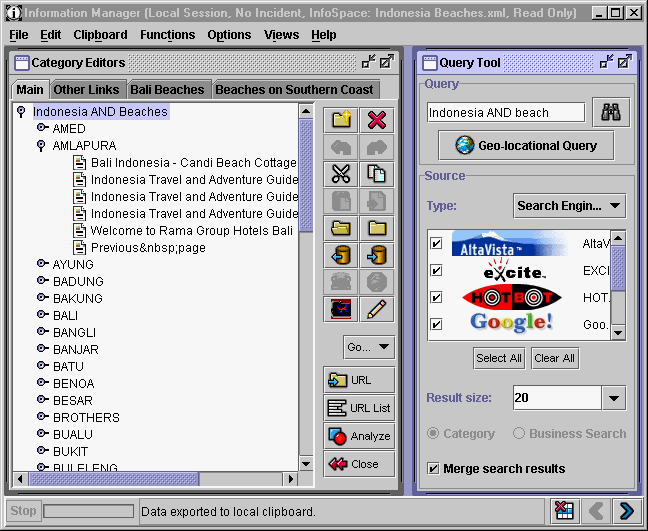
InfoManager.gif (33076 bytes)

Following is the list of the most important questions asked when using the GeoWorlds Information Manager component.

Beginners Level
  1. How can I query the web?
  2. How can I get the latest place names exported from the Map manager?
  3. How can I view the contents of a document on the "Document Analyzer" window?
  4. How can I switch back and forth between several windows being displayed?
  5. How can I execute one of the document analyzer services available on GeoWorlds?
  6. What services are available for use in GeoWorlds?
    Check availability
    Language identification
    Document summarization
    Date extraction
    Place name extraction
    Company name extraction
    Noun phrase extraction
    Document clustering
  7. What is the difference between a "Category Editor" window and a "Document Analyzer" window?
  8. How can I exchange documents between the Category Editor and the Document Analyzer windows?
  9. What is the difference between the Clipboard and the Clipbook?
  10. What is the basic functionality available for manipulating documents in the Category Editor?
    Create a new category editor tab
    Remove an existing category editor tab
    Select a category tab to work on
    Create a new category folder within the currently selected category tab
    Cut/Copy/Paste category folders
    Expand/Collapse a category folder
    Select documents in a category tab
    Interacting with a Web browser
    Take a snapshot of the selected documents' URLs
    Import/Export selected documents to a file
    Running analysis services on the selected documents
Advanced Level
  1. How can I perform a geo-located query?
  2. How can I exchange documents and/or categories among users?
  3. What is the advanced functionality available for manipulating category folders in the Category Editor?
    Compare
    Cross
    Intersect
    Subtract
    Add
    Duplicate
    Flatten paths
    Domain names
    Leaf nodes
    Categorize by property value
    Sort
    Sort recursively
    Prune out empty categories
    Count documents
    Clear property
    Set property
  4. How can I customize the software to my own needs?
    Set the maximum number of web sites visited
    Set the wrapper time out
    Ignore same domain URLs
    Set the web browser command
    View original source
    Automatically translate on download
    Set up the translation server
    Set up the summarization server
    Display document properties
    Automatically take snapshot on download
 

(C) Copyright 1998-2003 USC Information Sciences Institute. All Rights Reserved.
For problems or questions regarding this web contact [[email protected]].
Last updated: July 02, 2001 .